Showing posts with label to. Show all posts
Showing posts with label to. Show all posts
Tuesday, September 17, 2013
Simple step to Bootloader Moto Q9
| To day I will share about how to get into flash mode motorola, that is called bootloader. Bootloader definition on the moto Q9 is same as the moto Q8 bootloader that Ive posted previously, that is a way to get into "flash mode" that is the position where the phone is ready for the flashing process. For Moto Q9 bootloader simply by pressing * + # + Power on button (picture beside the green marked). When the LCD screen has appeared in white text, it means that have been entered into the bootloader mode and flashing mobile phones ready to process. What should be remembered that the condition Battre power should be full, so that no fatal damage occurs when the flashing process. Flashing Moto Q9 is usually a last option as well as the motto Q8 before a soft reset or hard reset to resolve the error on the mobile phone. So do it carefully and cautiously as well. |  |


Saturday, August 31, 2013
How to Hard Reset HTC Trophy
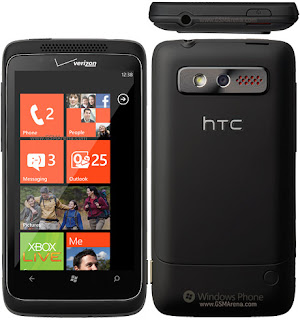 HOW TO RESET HTC TROPHY?
HOW TO FACTORY RESET HTC TROPHY?
HOW TO MASTER RESET HTC TROPHY?
HOW TO FACTORY SETTING HTC TROPHY?
HOW TO SOFT RESET HTC TROPHY?
HOW TO TOTAL RESET HTC TROPHY?
HOW TO HARD RESET HTC TROPHY?
HOW TO BASIC RESET HTC TROPHY?
HOW TO RESTORE HTC TROPHY?
HTC Trophy Factory Resetting:
1. From the Home screen, press menu icon and then tap Settings.
2. After above Tap SD and phone storage > Factory data reset.
3. Now Tap Reset phone, and then tap Erase everything.
HARD RESETTING HTC Trophy BY BUTTON:
1. Take out the battery, stay for a few seconds, and then reinsert the battery.
2. Press and hold the VOLUME DOWN button, and after that briefly press the POWERbutton.
3. Stay for the screen with the three Android images to appear, and after that free the VOLUME DOWN button.
4. Press VOLUME DOWN to choose FACTORY RESET, and after that press the POWER button.
Important:
* Please Do Not Reset Your Mobile without Any Unrecoverable Difficulty.
** Hard Reset Will Erase All User Data From Your HTC Trophy.
So Keep In Mind To Back Up Your Important Data Before Hard Reset.
*** Please Fully Charge Your Phone Battery before Reset Because Any Power Failure May Damage Mobile Permanently.
****Some Times Reset Can Damage Your Mobile.
Subscribe to:
Posts (Atom)