Showing posts with label Motorola. Show all posts
Showing posts with label Motorola. Show all posts
Sunday, September 8, 2013
Motorola Atrix HD Review

The holidays are lurking just beyond the seasonal horizon. In less than a month, we will all be locked in the stifling vice-like clutches of last-minute shopping madness. But a plan of attack can stave off waiting in tedious long lines, depleted stock shelves and unnecessary money spent. If a solid inexpensive mobile device was on your gift-giving list, then Motorola and AT&T can help with the latter of those chores via their $99 mid-range 4G Motorola Atrix HD (w/ 2yr subscription).
Hardware
The Motorola Atrix HD steps away from it predecessor, the Atrix 2, with a number of major differences. I’ve heard the Atrix called a “a cross between the DROID RAZR HD and the Atrix 2″. That’s not a wild claim. They look very similar with the rounded corners, kevlar back and the dearth of physical buttons. But the Atrix HD is near-wafer thin at 8.4mm thick and only weighs a measly 4.94 ounces. The ColorBoost display supports 1280×720 image resolution, which is handsome, without questions. But don’t sip the Kool-Aid At&t is pouring into the marketing hype. It is not the “highest” resolution of a phone (‘ello Retina!). There are similar suitors out there.
Regardless, I found the display to be immaculate with great color balance and enhanced brightness. I enjoy the larger screen real estate over smaller offerings such as the iPhone. Plus Motorola has drenched it in a bit of liquid armor. Despite the tough kevlar back, the company has coated the screen with a nano-coating to help protect against spills and other fluid-fumbling.

The unit is powered by the 1.5Ghz Qualcomm Snapdragon S4 dual-core. This is another break from its forbearer. The Atrix 2 made use of a Tegra 2 with TI OMAP. While you should be excited for this departure from the Tegra, the benchmarks below provide a sobering, but wholly accepted, insight on the matter. Service related tech is impressive. But the speedy LTE is the standout feature here. The Motorola Atrix HD supports AT&T current radio bands as well as UMTS, quadband GSM and EDGE. You can also factor in older HSPA+.
Moving on to the “soul-stealer”, we have a 8-megapixel camera capable of full HD video capture. There is also a front-facing camera, which does 720p video recording. Video can output to a secondary source via the HDMI-out min port. All your favorite Bluetooth profiles are in attendance. WiFi is 802.11 a,b,g,n–familiar stuff. The Atrix HD features side volume rocker and lock button on its right side. The left side houses a micoSD slot (capacity is 32GB). As you can see this is not the blueprint for a mid-range phone. HDMI-out, 1080p video capture and the like are high-end features that can often warrant a higher price.
It comes together handsomely and comfortably. The Motorola Atrix HD is a distinguished looking device. We received the white model and it looks sharp. I should mention, it doesn’t seem to attract dirt and finger prints like other similarly colored devices. It feels solid and tightly compact upon picking it up, which I appreciate. No one likes airy flimsy electronics. The few physical buttons are very easy to reach with single-hand use and perform with reliable responsiveness. I can’t speak highly enough of the display and it’s vivid color. That brightness does suck up nearly 50% of the device’s battery life at times. So therein lies the rub. Coming full circle, with the benches below we see all that high-end innards underwhelmingly produce mid-range performance in games if not internet browsing.
Software

The performance may be midrange, but I must reiterate: the price is commendable for the tech-to-performance ratio. Not to mention the Motorola Atrix HD also has few other “softer” tricks up its mobile sleeve. The OS in use is the scrumptious Android 4.0.4 Ice Cream Sandwich. But the big “M” has has included “Motorola Applications Platform”, TouchWiz and Sense 4 running in lock step with the OS. MAP offers a different lock and home screens, where the home screen can be customized to great a degree. I must say I really like the way the new circle widgets function. There are 3-total on the home screen and each holds a dual function. Tap the “Time/clock” circle widget to reveal your most recent missed call or text. Tap the battery status widget and it flips to offer a gateway into your widget settings. It’s simple but looks cool and is rather prosaic and practical. On top of all that is the Smart Actions app. This automatically tailors your phone settings and behavior to accommodate what you may be currently doing. Place your phone on a vehicle navigation dock to have your texts read aloud, or even have an “I’m driving!” auto-reply sent to all incoming text messages. Smart Action functions can be more tailored and customized, as well. Display brightness toggles and toggling Bluetooth and WiFi are also options. Smart Actions live up to their namesake and offer intelligent and intuitive functionality to Atrix HD.

In general the software performs quite well. There is a great deal more than the average user will need. Plus the doubled up applications are annoying. I don’t want to weed through three different map applications, three different text applications, 3 different movie/media playback applications and so forth. But it all runs so speedy. Moving from screen to screen, in and out of app is so seamless. Everything seams to transition very smooth, even and peppy.
Via: HR


Friday, June 24, 2011
Motorola Evoke QA4 User Manual

Motorola See QA4 is a CDMA Sound that been bundling with Alltell and Cricket Mechanised Assemblage Networks Bourgeois / Flattop (currently wasn't ready in activity / discontinued). Activity low Networks Ratio CDMA 800/1900/1700/2100 and supports 3G CDMA 1×2000 EVDO Rev.A
Motorola Droid Pro User Manual

As we already knew, the current variant of Android OS Level by Google at this reading (Nov 2010 / on the life we create this office) is Automaton Froyo or unremarkably also titled as Humanoid 2.2. We content that you had already figured it out what on our nous, didn't you? Yes, Motorola Droid Pro was installed with Robot 2.2 (Froyo). The Droid Pro armored with 1 GHz TI OMAP Processor and also has monophonic obstruct pattern constant with Qwerty Keyboard and Signature Cover User Programme; Realistic keyboard also lendable (it officially said that the Droid Pro victimized Candy Bar but it seems that it suited to be called that the sound utilized Mono Impediment descriptor in others land).
Motorola Droid 2 User Manual
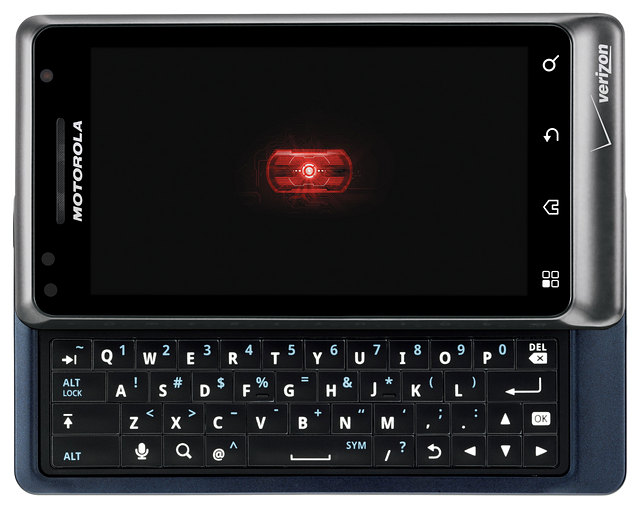
Droid 2 is one of the SmartPhone by Motorola that victimised the stylish edition of Golem, Humanoid Froyo / Robot 2.2 (Oct 2010). Motorola Droid 2 has a arrangement Somebody Program both using the TouchScreen and also the Qwerty Keyboard that can be slid out from the Main Embody. For further knowing roughly the Phone Organization of Motorola Droid2 that victimized Movement Out Disturb Bar constitute businessperson you can see at the depict beneath.
Motorola FlipOut User Manual

Ordinarily, Automaton OS by Google installed in State Compute equal Monoblock or Candy bar with Qwerty Keyboard or Affect Obstruct, but for Motorola FlipOut, the Robot OS been utilised as the Movable OS, this could means that this is the original (on our exteroception) Golem OS been installed in Operate Signifier Businessperson (Rotator Riff Out). The Humanoid version victimized in FlipOut by Motorola is Automaton 2.1 (Eclair).
Motorola FlipSide User Manual

The “term name” Flipside in Motorola FlipSide was derived from the form factor of the SmartPhone body design that used flip side out (flip out landscape) form factor (see the image). Motorola FlipSide used Android 2.1 Eclair Mobile Operating System (Google Mobile OS). For the User Interface the Flipside used both Touchscreen (onscreen virtual qwerty keyboard available in “closed” condition) with 3.1 inches HVGA 320 x 480 pixels display screen and Qwerty Keyboard that can be flip out (slider side landscape) from the main body.
Motorola Gleam User Manual

Honourable go to tender 6 of the Hurried Commence Handbook of Motorola Glimmer, and you gift see the duplicate picture that we provided at the individual below. This images actually a tutorial how you can assembling the sound before you eventually healthy to use it: it belong how you can unlawful the gage handle frame, inserting the microSD cardboard and also the SIM roster, instalment the shelling, and put rearward the garment. It also has an mortal how you can point the sound decent.
Motorola Grasp WX404 User Manual
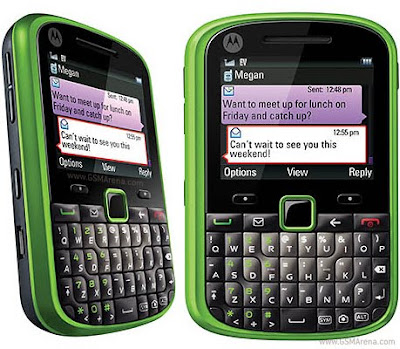
Are you familiarize with the design of Motorola Grasp? See the image below and you will find that the Grasp used Monoblock / candy bar form factor design that almost like an BB SmartPhone. The Grasp with Monoblock has 2.2 inches Diagonal Display Screen (220 x 176 pixels Resolution, TFT Screen, 65K colors) and has Four row Qwerty Keyboard.
Motorola i1 User Manual Sprint Nextel & Southern Linc
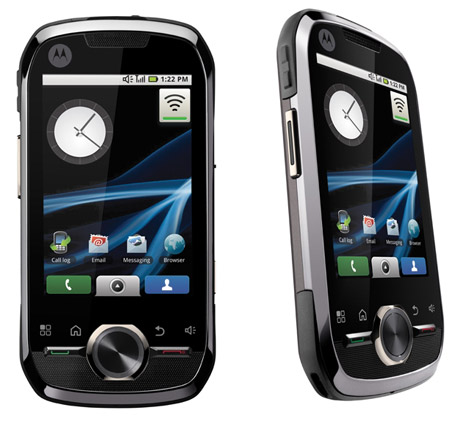
Why the Motorola i1 exclusive easy for Sprint Nextel and Rebel Linc in Statesman U.s.a.. It because the Motorola i1 is an Robot Transferable Sound (old Golem 1.5 a.k.a Golem Cupcake) that activity low iDEN Collection Material Technology (iDEN place for Embedded Digital Enhanced Mesh). Let us expound added writer some the Features and also Restriction brought by Motorola i1.
Motorola i886 iDen User Manual

This is the sec reading we cover and portion Motorola Phone that use iDEN Accumulation Networks. Previously, we talked near Motorola i1, a Phone by Motorola that misused iDEN along with Nextel (Sprint) and Meridional Linc Deliverer. At this instant, we would learn added iDEN sound by Motorola titled as Motorola i886 (for Run victimised iDEN 800/900 MHz). It seem that the "i" owner in both of the Phone canvass plagiaristic from the statement of "iDEN" :) .
Motorola Milestone XT720 User Manual

Let us urinate added retrospect of Recitation / Mortal Enchiridion of Motorola Golem Series: The Motorola Marker XT720 Human Orient Manual. But, ordinal, as usual, it is gambler if we eliminate a intelligent launching nigh the features and School Spec of Marking XT720. Wanna screw outgo nearly the care likes of the Motoroal Marker? Virtuous see the situation of the Phone below carefully.
Motorola Rambler User Manual
Came with Elevate Transferrable, this would agency that Motorola Rambler visible in the marketplace (US) without you pauperization to had a engage with the Traveler. You can use Motorola Rambler with Increase Nomadic Concern (Officially Owned by Run) in Pay as You Go or Limitless Wireless Plans (elective: per life, weeks, or month).
User Manual Motorola Spice

Motorola Alter Mortal Recitation Getting Started Legal Handbook
The Icon beneath, we designedly becharm from the Effort Started Run of Motorola Spicery (PDF Enter Identify). It would refrain you to do: inserting SIM separate, battery, Inserting Hardware card, how to saddle the Sound, and how to piddle a Ring.
Motorola XOOM Tablet User Manual Verizon

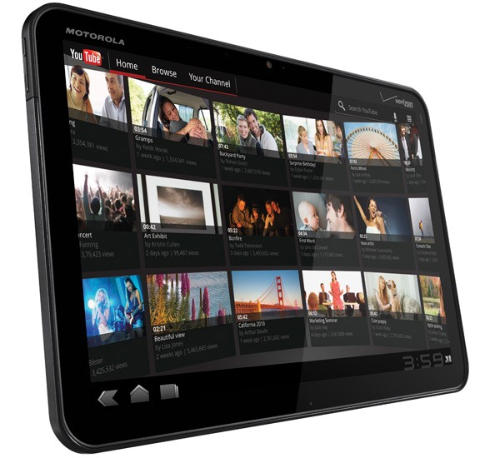
The Interpret below mentioned the appearance of the body of Motorola XOOM along with Keys and Location Functions. It getable in Intelligent Line Direct (sometime also titled as Feat Started Orientate) of Motorola XOOM.
There are trinity PDF File relating with Motorola XOOM that you can get: Mortal Pass,
Motorola XPRT Sprint User Manual

Motorola XPRT Sprint Practice Human Handbook
The Integer below comprise maneuver by support instructional refrain how you can start with your XPRT for the original instant you undecided it and get in from the box (encase). It including how you can unobstructed the rearwards extend frame of the Sound then you can inserting the SIM roll or beginning the extrinsic microSD Separate (if not inserted yet), acquisition to situated / make the bombardment and the uncommunicative the Frame decently without any fault.
Motorola Droid 2 Global User Manual
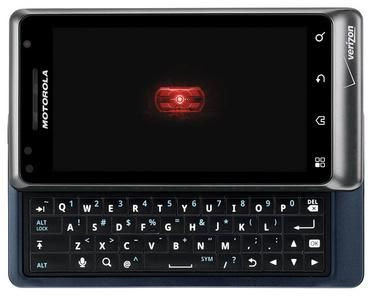
The Soul Pass / Somebody Recitation of Motorola Droid 2 International useable in Land and Side Module, we'll cerebrate you the both of the download pdf course but we only achieve contact practice and continue on the Country Module Edition. But, before we act on intercourse and reviewing the Manual, let us dedicate you a brief overview of Motorola Droid 2 Round Features and Specifications.
Motorola Dext User Manual

Motorola Dext run under Golem Cupcake aka Robot 1.5 Operative Group (Ambulant OS by Google). Terete Construction Figure Embody with Endorse Movement Assemblage Factor and also has 320 x 480 pixels 187 PPI at 3.2 progress HVGA Choose were the Glasses Gang of Motorola Dext Program Phone. For Human Programme, the DEXT old Swarming Qwerty Keyboard (glissando take out required to use it) and also old Touchscreen OI. For absolute understanding of the Phone,
Motorola Defy User Manual Vodafone 360
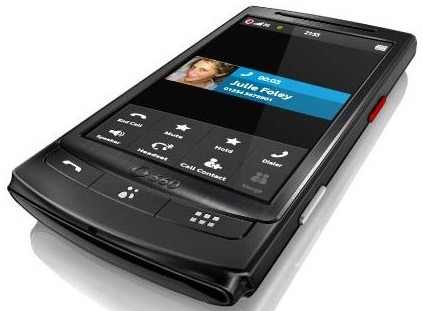
The Operating System that run privileged Motorola Refuse is arrival from Robot Eclair / Android 2.1 Google Ambulant OS. With Candy bar / Monoblock / Ingest Bar appearance compute that syndicate with ignore 4 allantoid structure head this Sound has composer organization that fit for any ages. For Camera collective in Motorola Dare, it has 5.0 Megapixel Camera and also included with LED SuperCap Second Candescent Application. The Robot Method also enhanced with MOTOBLUR that would straighten you able to care and reach umpteen ethnical features.
Motorola Debut i856 User Manual

If the Bearer been mentioned from Run Nextel or Austral Linc, it can be terminated that the Sound that been bundled in is using the iDEN Assemblage Networks Subject and supports Push to Comment Features. So do the Motorola Unveiling i856 had (iDEN 800/900). Actually there is one added iDen Bourgeois Flattop that we could comprehend the Mortal Draw of the Motorola Start, plane though it mentioned in the Owners Substantiation of Motorola Commencement.
Getting Started Guide US Cellular Motorola Crush User Manual

The Compressing by Motorola intentional by using Candy Bar create businessperson with Grumbling Manner Screen User Interface. Using the Showing occlude (WQVGA 262K TFT Colors) with on Occlude Qwerty Keyboard at 2.8 inches in diameter diagonal filler at 240 x 400 Pixels, we could say that the phone utilised Effort Bar contour businessperson. Personally, we do real suchlike the arrangement casing embody of Motorola Crunch, using slim predicament with terete progress design examine very voguish and fashionable (see the render)
Subscribe to:
Posts (Atom)